
In May 2021 a Google Nest Hub sitting on a kitchen counter downloaded a routine update and rebooted.
It came back running a completely different operating system. Same home screen, same photo frame, same alarms. Underneath, the Linux kernel was gone.
The only people who noticed were the ones reading the technical information page in Settings. Google had performed an OS transplant on a shipping consumer device, and it passed unremarked.
This post sets out what Fuchsia actually is, why it exists, and what it has to show for seven years of work.
Seven years of a repository nobody announced
A quiet start
In August 2016 a repository named fuchsia showed up on Google’s git servers.
There was no blog post and no press release, only a one-line description: “Pink + Purple == Fuchsia (a new Operating System)”. That was the entire announcement, and people found the repository by accident.
The next few years went roughly like this. In 2017 the project grew a graphical shell called Armadillo, built in Flutter, and screenshots of it went around as proof that Google was building an Android replacement.
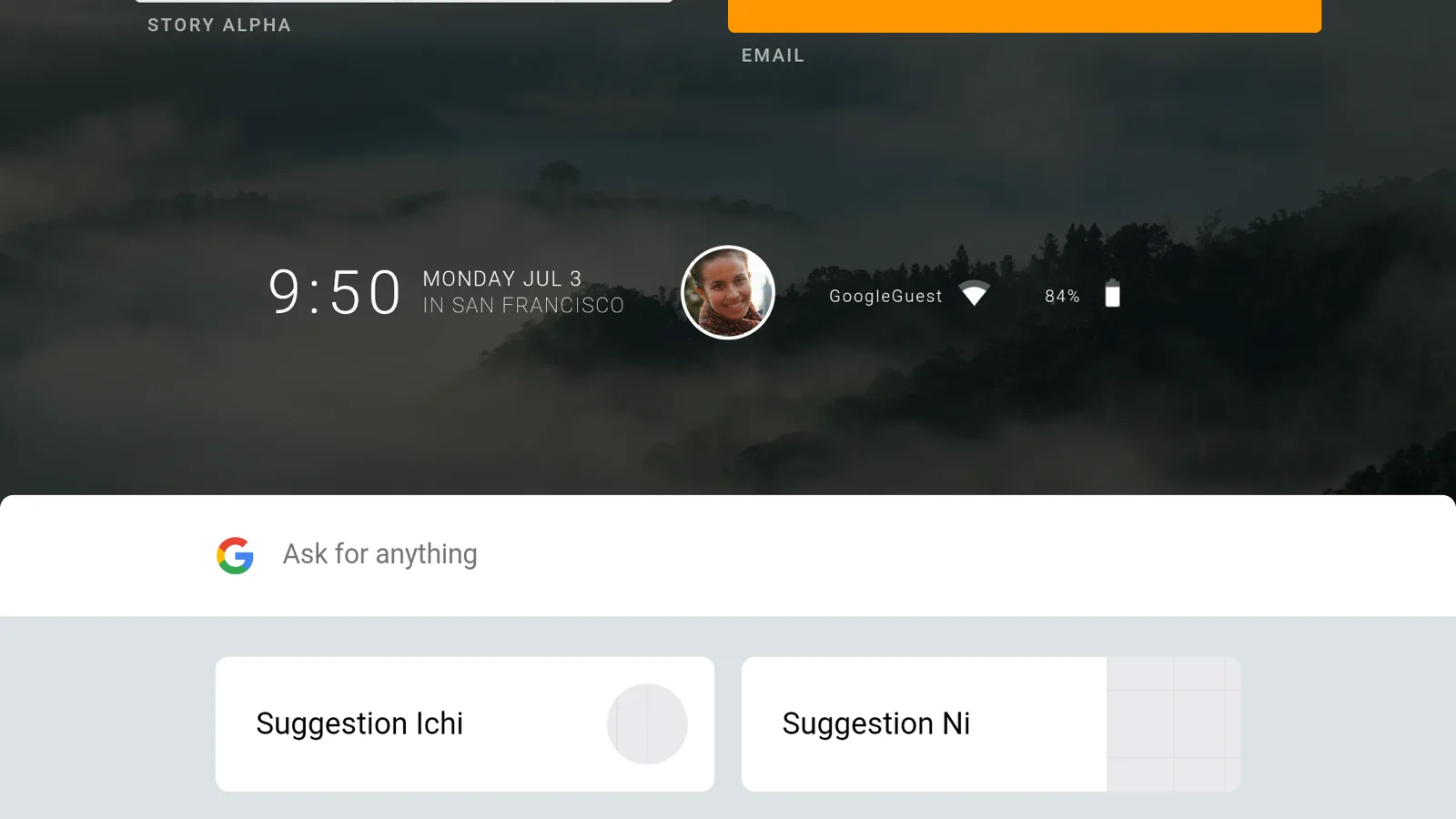 Fuchsia’s Armadillo UI, July 2017. Source: Wikimedia Commons (Apache License 2.0)
.png)
At Google I/O 2019, Hiroshi Lockheimer addressed the project directly. Fuchsia was an experiment with new operating system concepts, he said, and people should not assume it was a phone OS.
The same year the project got a documentation site at fuchsia.dev. In December 2020 it gained public mailing lists, a published roadmap, an issue tracker, and an RFC process for design decisions, which gave it the shape of a real open source project.
Shipping in a product
Then in May 2021 it shipped.
The first-generation Nest Hub replaced its Cast-based software with Fuchsia, with no visible change to the interface. The Nest Hub Max followed in 2022, and in May 2023 the second-generation Nest Hub started receiving Fuchsia builds.
The naming is exactly as unserious as it looks. Zircon, the kernel, was originally called Magenta and was renamed in 2017. Escher, Scenic, Garnet, Topaz, Starnix: the project names read like a gemstone catalogue, and several of the layers they referred to no longer exist.
And then 2023
This year has been less kind.
In January, Google’s company-wide layoffs hit the Fuchsia team. Reporting from The New York Times and 9to5Google put the cut at around 16% of a roughly 400-person org.
In July, support for Assistant speakers was removed from the tree. The Nest Mini, Nest Audio, and Nest Wifi, all of which had been slated for Fuchsia, were marked unsupported.
So: an operating system with seven years of development, three shipping product lines, all of them smart displays, and a team that just got smaller.
Why not just use Linux?
Google runs more Linux than almost anyone alive. Android, Chrome OS, and the fleet that serves search results are all Linux.
Writing a new kernel from that position is an odd thing to do. So what was missing?
The reasons Google has given publicly are architectural, and they show up in the project’s stated principles: simple, secure, updatable, performant.
Updates
The first is the update story, which Android has been fighting its entire life.
A device ships with a kernel, a vendor BSP, and a pile of out-of-tree drivers. Moving the version forward means the OEM has to rebuild and re-certify the whole stack.
Project Treble in 2017 and Project Mainline in 2019 were both attempts to cut seams into that stack after it had already set.
Linux does not help here, by design. The kernel deliberately has no stable in-kernel driver ABI, on the theory that drivers belong in the tree where they can be fixed along with everything else.
That is a defensible engineering position, and it is also the reason a three-year-old phone is stuck.
Security
The second is security. A Unix process starts with authority it never asked for.
It can see the whole filesystem, it can walk /proc, and it has a user ID that grants it things. We then spend enormous effort taking that authority back with namespaces, cgroups, seccomp, SELinux, and containers.
Fuchsia’s answer is to never hand it out in the first place.
Form factors
The third is form factors, and it is the least discussed.
The original repo mentioned everything up to and including traffic lights. A smart display with no touchscreen, or a speaker with no screen at all, is not what Android’s application model was designed around, even if it can be made to work.
Licensing, the fourth reading
There is a fourth motivation you see in commentary, and it is worth flagging as commentary rather than fact.
Plenty of analysts have argued that Fuchsia is really about licensing and control: the GPL obligations of the Linux kernel, the years of Oracle litigation over the Java APIs in Android, and the leverage OEMs hold over the update pipeline.
Fuchsia is indeed BSD, MIT, and Apache 2.0 throughout, and Google controls delivery directly on the devices it ships.
The GPL half of that argument looks overstated, though, since Android already keeps nearly everything above the kernel under permissive licenses. Google has never framed the project this way publicly, so treat it as inference.
| Linux / Android | Fuchsia | |
|---|---|---|
| Kernel scope | Monolithic: drivers, filesystems, network stack in kernel | Zircon handles threads, memory, IPC, scheduling; the rest is user space |
| Default authority | Ambient: user IDs, global filesystem, /proc | None. A new process holds only the handles it was given |
| Driver ABI | Deliberately unstable, drivers live in-tree | A stable driver ABI is an explicit goal, not yet delivered |
| Update unit | System image, per vendor | Package, resolved by content hash |
| IPC | Many mechanisms, mostly hand-rolled protocols | One IDL (FIDL) over one primitive (channels) |
Zircon
Zircon is where Fuchsia stops being a variation on anything familiar.
It started as a fork of LK (Little Kernel), an embedded kernel written by Travis Geiselbrecht, and grew a process model, user mode, and a capability system on top.
Zircon is 64-bit only and assumes it is running on a machine with real resources, which is the opposite of what LK was for.
What the kernel exports
The kernel exposes around a hundred syscalls, and almost all of them are non-blocking.
The exceptions are the ones whose entire job is to wait: zx_object_wait_one, zx_object_wait_many, zx_port_wait, zx_nanosleep. Everything else is an object operation.
That word “object” is load-bearing. Zircon does not export a filesystem to user space. It exports kernel objects, you talk to an object through a handle, and a handle carries a set of rights.
| Object | What it is |
|---|---|
| Job / Process / Thread | The scheduling and resource hierarchy. Jobs contain processes, and limits apply down the tree |
| Channel | Bidirectional message pipe carrying bytes and handles. The backbone of all IPC |
| VMO | Virtual Memory Object: a chunk of memory you can map, share, or resize |
| Port | Where a thread parks to wait on signals from many objects at once |
| Event / Futex | Signalling and userspace locking primitives |
What the handle model changes
The consequences are bigger than they first look. To start with, there is no fork().
Forking means inheriting an entire address space and an entire authority set implicitly. Process creation goes through fuchsia.process.Launcher, which takes an executable and an explicit list of handles.
There are no Unix signals either. Zircon uses object signals and an observer pattern, so asynchronous events arrive on a port you chose to wait on instead of interrupting whatever you were doing.
So what does a fresh process hold? Nothing.
No filesystem, no network, no clock, no parent. It holds exactly the handles its creator passed in, and it cannot reach anything else, because there is nothing ambient to reach for.
Calling Zircon a microkernel is half right. It is far smaller than Linux and pushes drivers and filesystems into user space, but it is not a minimal microkernel in the seL4 sense. The project’s own documentation describes it as a kernel plus a set of core userspace services, and the syscall surface is considerably wider than a purist would accept.
Chromium, Cast, session UI"] SVC["System services
filesystems, netstack, package resolver"] DRV["Drivers
driver hosts, one process per group"] end KRN["Zircon
threads · virtual memory · IPC · scheduling"] HW["Hardware"] APP --> SVC SVC --> DRV US --> KRN KRN --> HW
Everything is a component
Unix says everything is a file. Fuchsia says everything is a component, and means it more literally than the slogan suggests.
Manifests and the tree
A component is a program plus a manifest.
The manifest, a .cml file, declares what the component needs, what it provides, and who it hands things to.
Components form a tree. Each one can have children, and a component together with its children is a realm. A component’s position in that tree is its moniker, which looks like a path and works like one.
Routing capabilities
Capabilities move along the edges of that tree in three ways.
A component can use a capability it needs, a parent can offer one to a child, and a child can expose one to its parent. There is no fourth option and no registry to go shopping in.
If nobody routed a capability to you, it does not exist as far as you are concerned.
{
    include: [ "syslog/client.shard.cml" ],
    program: {
        runner: "elf",
        binary: "bin/echo_server",
    },
    capabilities: [
        { protocol: "fuchsia.examples.Echo" },
    ],
    expose: [
        {
            protocol: "fuchsia.examples.Echo",
            from: "self",
        },
    ],
}
At runtime, the capabilities routed to a component become its namespace. This is what replaces the global filesystem.
What looks like a POSIX directory tree to the program is a private view assembled from what its parent offered, typically its own read-only package contents, some private storage, and a handful of protocols.
(parent realm)"] SRV["echo_server"] CLI["echo_client"] SRV -- "expose fuchsia.examples.Echo" --> CORE CORE -- "offer fuchsia.examples.Echo" --> CLI CORE -- "offer fuchsia.logger.LogSink" --> SRV CORE -- "offer fuchsia.logger.LogSink" --> CLI
Runners and resolvers
Two more pieces make the model extensible.
A runner is the thing that actually executes a component, and it is itself a capability. The ELF runner runs native binaries, and other runners host other runtimes.
A resolver turns a component URL into a manifest and a set of blobs.
Both are replaceable, which is how an entire foreign runtime can be dropped into the system later without special-casing it in the kernel. Hold that thought for the Starnix section.
Reading manifests for the first time leaves the impression that this is a lot of ceremony to start a program. It is.
What you get for it is that the dependency graph of the whole system is written down in files, checked by the build, and enforced at runtime by the OS rather than by discipline.
FIDL, and why the seams matter
If most of the operating system lives in user space, then most of the operating system is IPC.
Filesystem access is IPC. Talking to a driver is IPC. So the interface language stops being a convenience and becomes the actual system ABI.
FIDL is that language. You declare a protocol, the compiler generates bindings for C, C++, Rust, Dart, and Go, and the messages ride on Zircon channels. The kernel knows nothing about FIDL; it moves bytes and handles.
library fuchsia.examples;

@discoverable
protocol Echo {
    EchoString(struct {
        value string:64;
    }) -> (struct {
        response string:64;
    });
};
A deliberately boring wire format
The wire format is deliberately boring.
Little-endian, natively aligned, fixed layout, no compression, no pointer patching. You can read a message in place without allocating.
For a filesystem server answering thousands of requests a second, that determinism is the point.
Versioning
The genuinely interesting part is versioning.
Components are built against a target API level, and the resulting package carries an ABI revision in its metadata, which you can see with ffx package far list on a meta.far.
So the platform knows which contract a given binary expects. That is the mechanism behind the updatable principle.
If the platform can tell what an old component was compiled against, the platform can keep honouring it while everything else moves.
Whether that holds up over a decade is unproven. It is, however, a real design answer to a real problem.
Packages and drivers
A package is not a file
A Fuchsia package is not a file.
It is a meta.far archive holding the package’s identity and a content listing, plus a set of blobs, and every blob is named by its Fuchsia Merkle Root: its content hash. Identical files across different packages are stored exactly once.
A package resolver fetches what a component URL points at, and the package server acts as the root of trust.
The useful property here is hermeticity. Nothing resolves by name at runtime and gets whatever happened to be installed.
Subpackages extend this. A package records the hashes of its dependencies, so a dependency cannot change without changing the parent’s hash too. Dependency hell is closed off at the naming layer instead of being patched over by a resolver.
Drivers in user space
Drivers get the same treatment one level down.
Fuchsia drivers are shared libraries loaded into driver host processes in user space under a driver_manager component, and they are more restricted than a normal process. A driver cannot reach the filesystem or enumerate arbitrary devices.
What happens when a driver crashes? A driver host crashes, and the driver manager deals with it. The machine does not.
Drivers talk to the framework, to each other, and to the rest of the system over FIDL. Co-located drivers get a driver runtime that mimics the Zircon channel and port primitives in-process, so two drivers in the same host can talk without crossing into the kernel.
The driver ABI is where the vision and the current state diverge most. A stable driver ABI has been a goal since the first driver framework and is still not delivered as of 2023; DFv2 is explicitly described as evolving and not yet ABI stable. The promise that a driver compiled once keeps working across platform versions is still a promise.
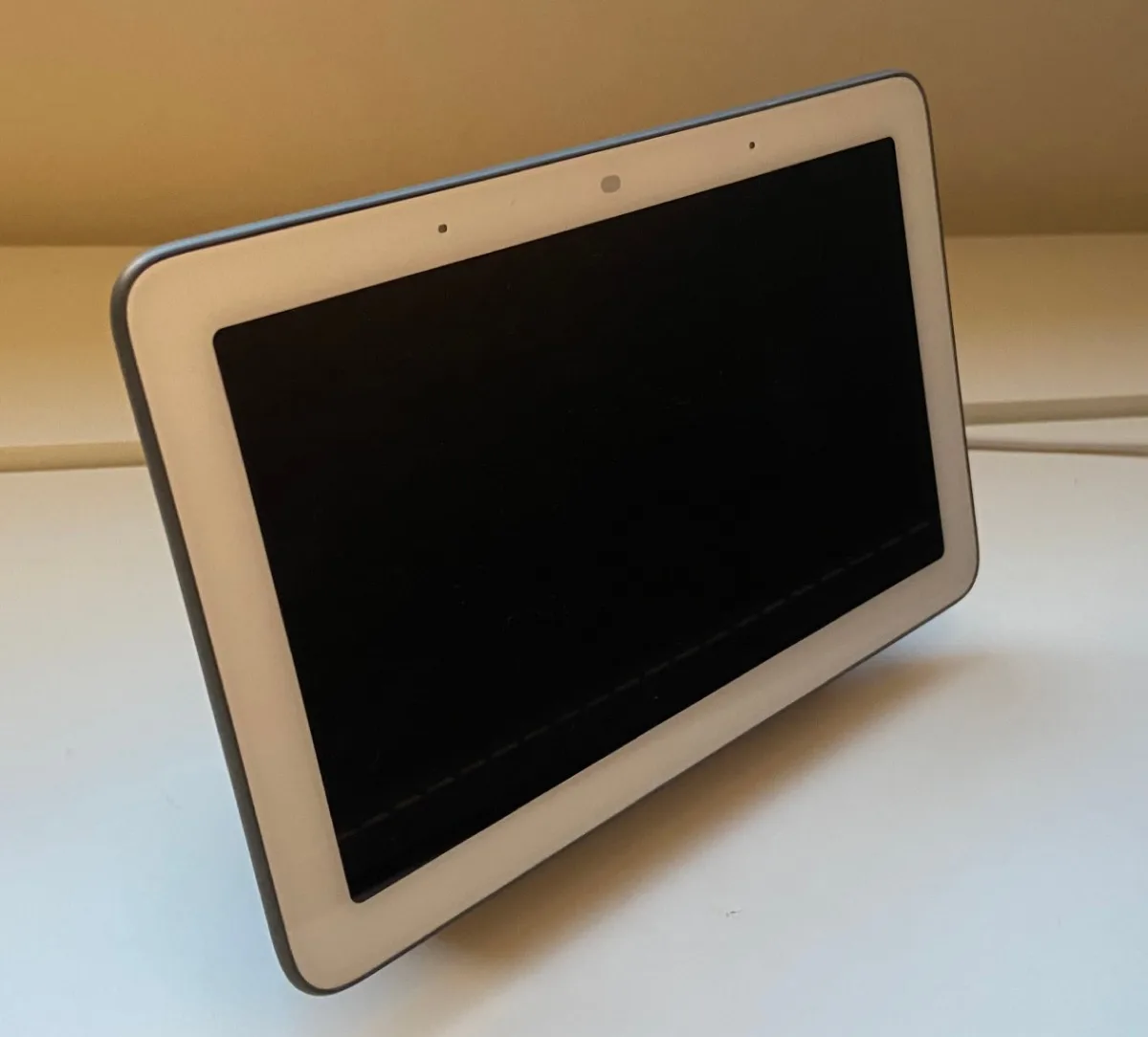 The Nest Hub, which has now been through an entire kernel replacement without asking anyone. Photo: Graceoftheshire, CC BY-SA 4.0

This is what made the Nest Hub migration possible at all.
Google did not push a new firmware image and hope. It pushed packages, into a system where the graphics stack, the Cast runtime, and the drivers are separately resolvable units.
Starnix, the pragmatic part
Here is the problem with a clean-room OS: nobody has anything that runs on it.
Android applications ship native code compiled against Linux. You cannot ask the world to recompile.
Starnix is Fuchsia’s answer, proposed in RFC-0082 and worked on since 2021.
It is a runner that implements the Linux UAPI, the syscall interface Linux binaries expect, and translates it into Zircon operations. Unmodified Linux binaries run as Fuchsia components, and there is no virtual machine or emulated hardware anywhere in the path.
The test targets were chosen the way you would choose them if you were serious: low-level binaries from the Android source tree, and cases from the Linux Test Project.
By 2022 a Starnix shell was available in Fuchsia workstation builds. It was not a generic Linux environment but a small Android distribution running on top of Fuchsia, reachable over adb like any other Android device.
Around the same time the device/google/fuchsia directory was deleted from AOSP, which read to a lot of people as one approach ending and another beginning.
The Windows comparison is the right one. WSL1 did the same thing in the other direction: implement the Linux syscall interface on a foreign kernel rather than ship a VM. It was good enough for an enormous amount of real work and eventually lost to WSL2’s actual Linux kernel. The Fuchsia team studied both WSL1’s wins and its failure modes before starting.
The parts that did not work out
A fair writeup of Fuchsia in 2023 has to include the retreats, because there have been several.
Flutter everywhere
Flutter was supposed to be the application story. The 2017 UI was Flutter, the early SDK was Dart-first, and the coverage assumed Fuchsia and Flutter were a package deal.
Then RFC-0176 landed in 2022. New Dart programs are not allowed in the Fuchsia source tree, existing ones live on an allowlist, and anything new needs an exemption.
The stated reasons were toolchain tradeoffs around binary size, performance, and startup latency, plus the cost of keeping the Dart runtime updated in-tree.
Dart did not get deleted. The Flutter-everywhere narrative, however, quietly stopped being true.
A 2D screen built in 3D
The graphics stack turned over too.
Scenic’s original Gfx API modelled the screen as a 3D scene, complete with the volumetric soft shadows Escher was built for.
It turned out every real client, Flutter and Chromium and the session shell, was doing extra work to flatten a 3D scene back into the 2D product it actually was.
Flatland replaced it with a 2D composition API that maps onto display controller hardware, and Gfx is deprecated.
A narrower scope
Then January’s layoffs, and then July’s decision to drop the Assistant speakers.
Whether that was the Amlogic chip in those speakers failing Fuchsia’s CPU requirements or a narrowing of scope after the cuts, the outcome is the same. After seven years Fuchsia runs on smart displays, and the list is not growing this year.
There is also a cost nobody has escaped. Moving drivers and filesystems into user space means IPC on paths where Linux does a function call.
The answers are good ones, such as the in-process driver runtime that keeps co-located drivers out of the kernel, but they are answers to a self-inflicted cost.
What is worth taking from it
Fuchsia does not look likely to replace Android. The ideas in it, though, are portable.
The big one is capabilities instead of ambient authority.
The industry has been converging on it from the other side for a decade. Every container runtime, every seccomp filter, every IAM policy is an attempt to claw back authority that was granted by default. Fuchsia’s version is what it looks like when you start from zero instead.
Then the manifests. A system where every dependency between components is declared in a file, verified by the build, and enforced by the OS is a system where you can answer “what can this thing reach” by reading, not by testing.
And content-addressed, hermetic packaging, which is the same idea as a lockfile and a container digest pushed all the way down to the drivers.
What Fuchsia has delivered is smaller than what it promised. What remains is that an operating system replaced itself underneath a shipping consumer product, over the air, and the users never found out. Whether anything else gets to inherit that is the thing to watch next.
References
- Fuchsia (operating system) — Wikipedia
- Fuchsia documentation: concepts, principles, kernel, components, FIDL, packages, drivers
- Software isolation model — fuchsia.dev
- RFC-0082: Running unmodified Linux programs on Fuchsia
- RFC-0176: Disallow new Dart programs in the Fuchsia source tree
- Flatland 2D composition in Scenic — fuchsia.dev roadmap
- Fuchsia starts rolling out to 2nd-gen Nest Hub — 9to5Google
- Google abandons work to move Assistant smart speakers to Fuchsia — 9to5Google
- Mass layoffs hobble Google’s Fuchsia and Area 120 teams — Android Police
- 구글 퓨시아 OS, 구글의 새로운 변화 — brunch